Built on 20 years of finance expertise 99%+ accuracy guaranteed Your data stays in the EU

Automated bookkeeping preparation – using your existing software

The AI assistant for accounting firms. Invoices and bank statements flow in by upload or email. The system reads, categorizes, matches payments to invoices, and flags what's missing. Export clean results into your accounting software. You focus on review.

Single and double-entry bookkeeping Multi-currency support No templates, no rule setup Works with your accounting software English, German & Hungarian interface
App screenshot

How it works

Four steps from document to export

The manual work shrinks – your control stays.
Designed for how accounting firms actually work: many clients, diverse documents, limited time.

1
Collect
Upload PDFs, images, or whole ZIP archives – or let clients forward invoices, receipts, and statements to their dedicated email address. Everything lands with the right client automatically.
2
Automatic processing
The system extracts every field, assigns categories and VAT codes, and recognizes your partners – learning from your past corrections, per client. No manual setup per vendor required.
3
Gaps and review
Payments are matched to invoices automatically. Missing invoices and uncertain items are flagged – and you can ask the client right on the record. You only review the exceptions.
4
Export to your accounting software
Clean, VAT-complete data exports as Excel or CSV – or directly into supported systems. No system migration needed – your current tools stay in place.

Document management

All invoices, bank statements, and contracts in one place

No more searching through folders and inboxes. Documents stream in from uploads and email – organized by client, deduplicated, permanently archived, and fully searchable. One authoritative place for your whole team and your clients.

Every channel covered.
PDF, image, or ZIP upload – plus a dedicated email-in address for every client. Duplicates are caught on arrival, even when the same invoice comes in twice through different channels.
Missing document detection.
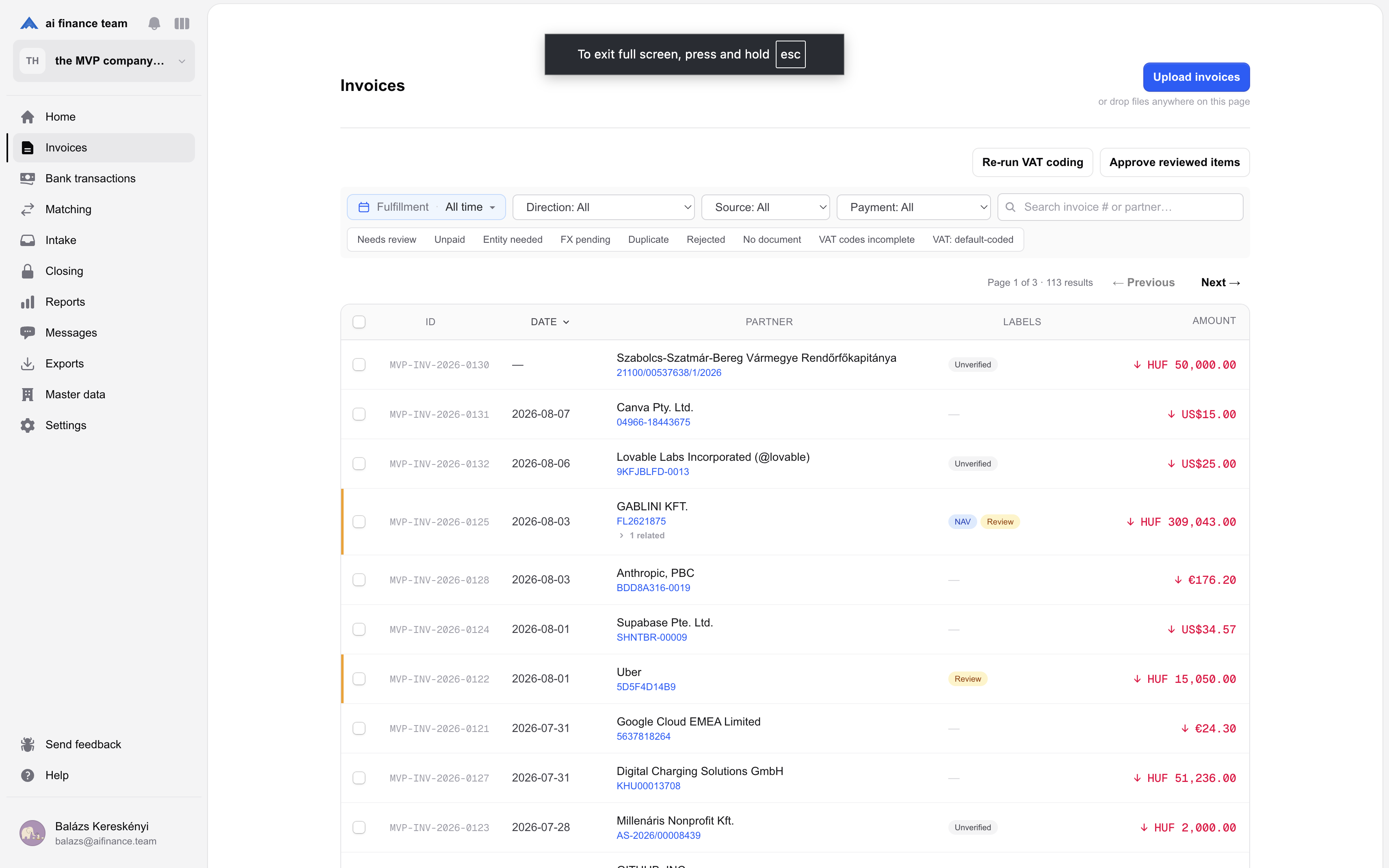
The system flags bank transactions without a matching invoice, identifies those that don't need one, and tracks payment status on every invoice – open, partially paid, or settled.
Ask the client on the record.
Built-in two-way messages attached to the exact invoice or transaction – no more email threads. Ready-made templates and AI-drafted questions included; clients answer right where the question lives.
Unlimited clients.
Your monthly quota can be freely split across any number of clients. No hidden fees per client or user.

Reconciliation

Payments matched to invoices, automatically

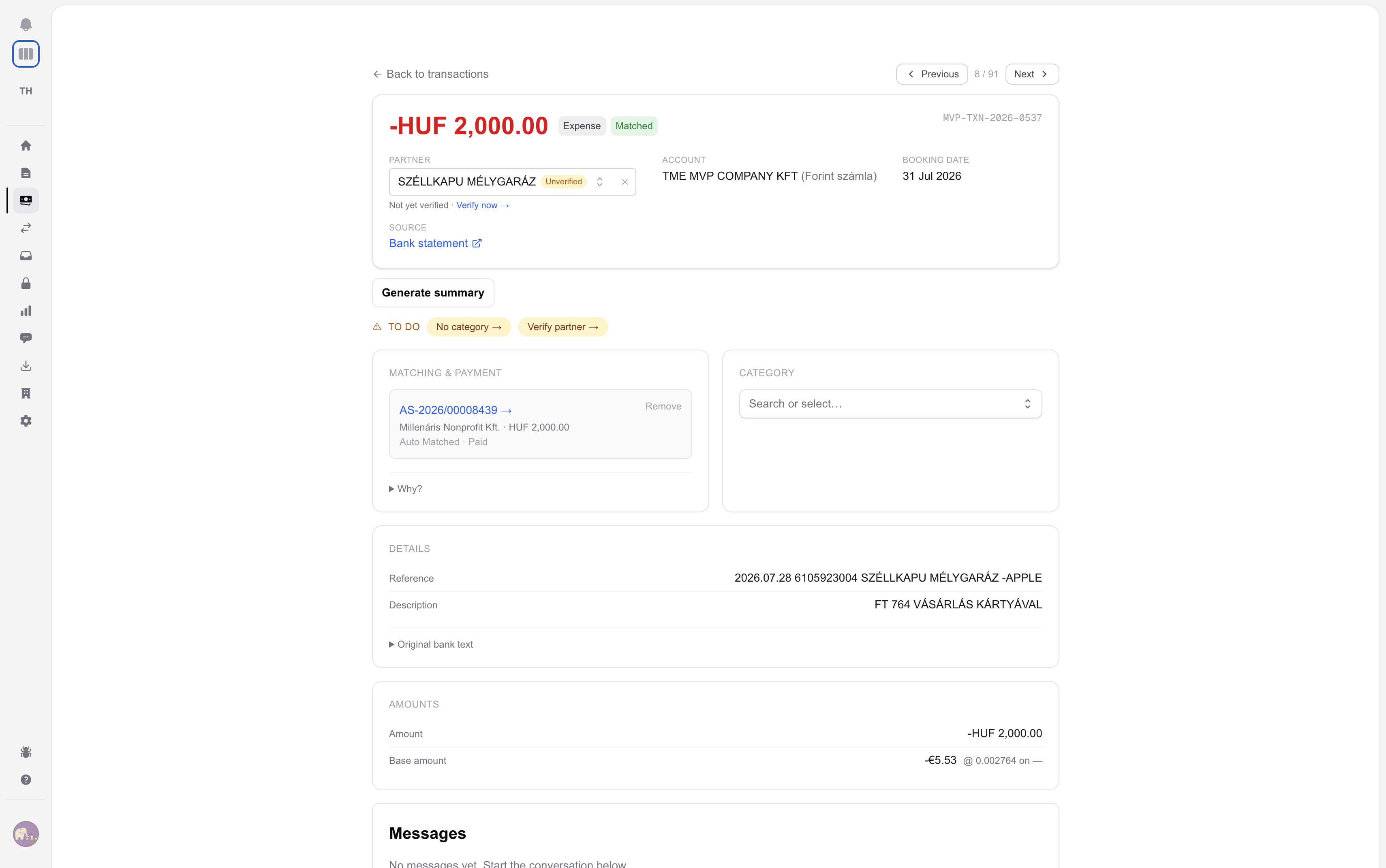
The daily grind of reconciliation happens on its own. High-confidence matches are booked automatically; borderline cases queue up as suggestions with the AI's reasoning attached. You approve or reject in one click – from a single dashboard across all your clients.

Handles the hard cases.
Foreign-currency card payments, one transfer covering several invoices, partial and overpayments – the engine scores every candidate pair and explains its confidence in plain language.
Partner ledger built in.
Per-partner receivables and payables with due-date aging and unapplied payments – the account statement view accountants actually use, always current.
Nothing slips through.
Transactions that need no invoice – bank fees, payroll, taxes, internal transfers – are recognized and set aside. Everything else stays flagged until it's resolved, with a full audit trail on every decision.
Invoice–payment matching in AI Finance Team

Added value for your clients

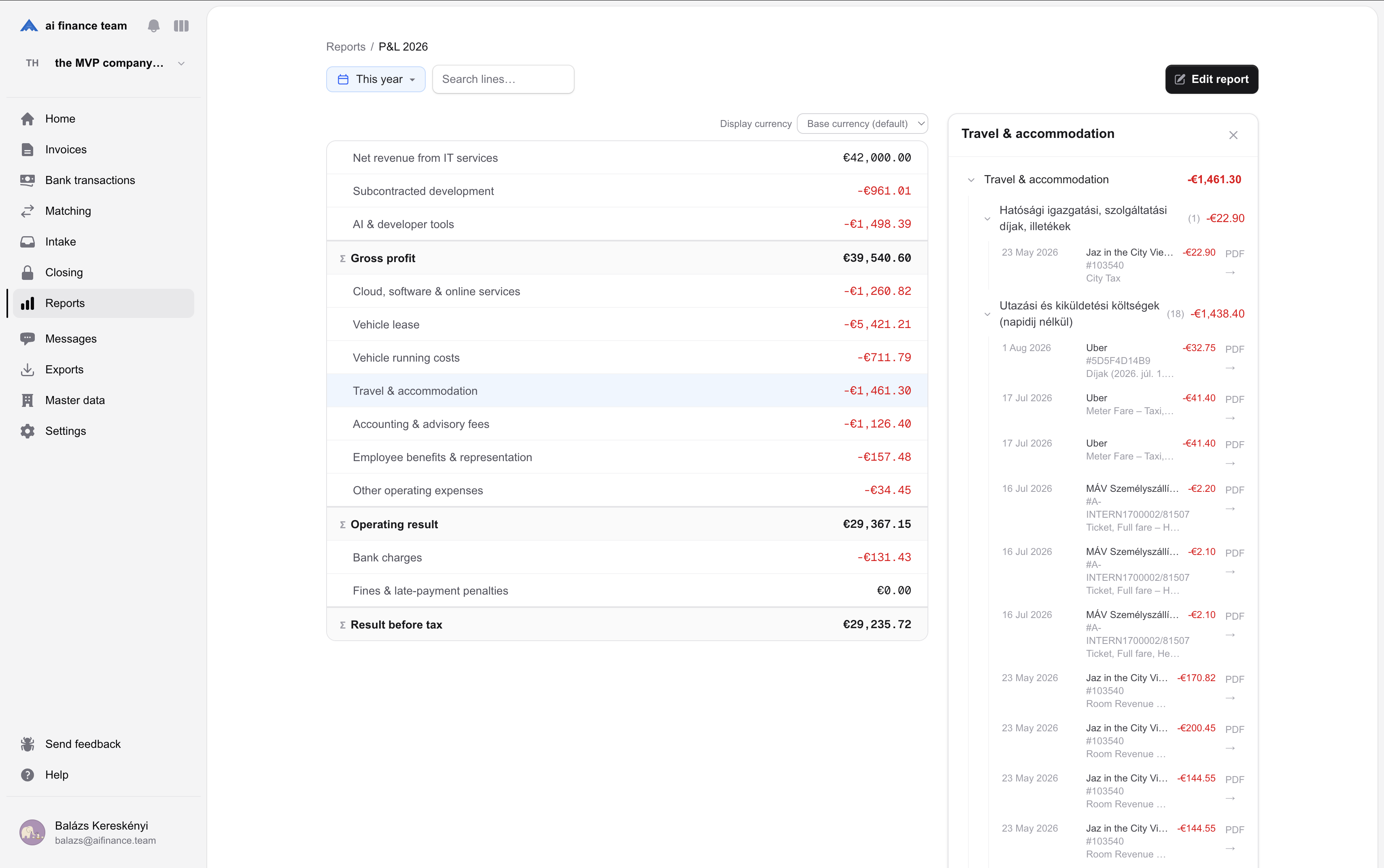
Automatic P&L reports for every client

The processed data automatically generates P&L and cash-flow statements with your own category structure. Your firm delivers not just bookkeeping, but financial insight.

P&L and cash-flow.
Automated statements built on invoice and bank data, with period-over-period comparisons and formula-based calculated rows.
Break it down your way.
Define your own categories and calculated rows per client – then break results down by project, team, or cost center with analytical dimensions.
Drill down to the document.
Every number in a report opens into the exact invoices and transactions behind it. Share reports with your clients – answers come with evidence, and your advisory role grows beyond data entry.
Financial report in AI Finance Team

What makes us different

Not template-based OCR – a learning system

Traditional OCR tools rely on rigid templates: a separate rule for every vendor. AI Finance Team uses computer vision and AI – you define categorization rules in plain text, and the system learns from every correction, per client. No manual configuration per vendor.

And you're never locked into menus: filter the ledger by asking in plain English, German, or Hungarian – or connect the AI assistant you already use (Claude, ChatGPT, Le Chat) and work with your clients' books conversationally. Every AI decision shows its confidence and reasoning, and every action is logged.

How confident the AI processor is about the read data

95

Reason for the above confidence

Data residency

Your clients' data stays in Europe

Invoices, bank statements and reports stay on European servers – and so does the AI that reads them.

Nothing you upload trains an outside AI model What the system learns stays with your firm The AI company never sees your files – no system, no person A GDPR data processing agreement for your firm

Pricing

Predictable monthly fee, no hidden costs

One plan per firm, with unlimited clients and users. Pick the document volume that fits, start a 14-day free trial, and only pay more if you go over.

Squirrel

Solo bookkeepers & small firms

€75 / mo

500 documents / month, then €0.30 / doc

Start free trial
Most popular

Beaver

Growing practices, 10–30 clients

€275 / mo

2,000 documents / month, then €0.30 / doc

Start free trial

Bear

High-volume & multi-office firms

€650 / mo

5,000 documents / month, then €0.30 / doc

Start free trial
See full plans & pricing

Prices exclude VAT. Save ~15% with annual billing. Book a demo

Compatibility

We don't replace your accounting software – we complement it

Your clients don't buy bookkeeping preparation – they buy professional attention. We take the preparation off your team's plate; the control stays with you.

Why trust us?

A team of finance experts and software engineers

We're not a random tech startup chasing trends. Nearly 20 years of finance expertise, combined with software product management thinking. We interviewed 25 accounting firms before building – and the product keeps being shaped by their daily feedback.

Built with domain expertise

Our team combines finance and technology backgrounds with decades of experience in both. We know what it's like when daily admin eats into time for higher-value work. That's why we built a tool that takes the mechanical bookkeeping preparation off your team's plate – not with promises, but with working software.

Frequently asked questions

The key questions, answered

Who is this for?
Primarily accounting firms that manage documents for multiple clients and want to reduce manual bookkeeping preparation.
How many clients can I manage?
Unlimited. Most of our partners manage 5–30 clients, but the system scales to larger portfolios as well.
What types of documents does it handle?
Invoices, receipts, and bank statements as PDF or image files – in any language and any currency, with official ECB exchange rates applied automatically. Contracts and other business documents are filed and summarized too.
How is this better than OCR?
The system uses computer vision, which is more accurate than traditional OCR, and can identify relationships between data points – like matching transactions to invoices automatically.
How accurate is the system?
For machine-generated documents, internal testing across thousands of invoices shows 99%+ accuracy. For handwritten documents, 95%+. The system flags anything it's unsure about – you only review those.
Do I need to review every document?
No. The system flags uncertain items and explains the reason in plain language. You only review what's been marked.
What happens when documents are missing?
The system flags bank transactions without a matching invoice, and also identifies those that don't require one (internal transfers, loan payments, payroll, etc.).
Does it work with custom accounting software?
Yes – with any software that supports data import (XLS, XML, API). For specific systems – like DATEV or BMD – we build the integration directly into the product.
How much setup is required?
Minimal. Provide your chart of accounts and preferred category structure – or simply import partners and categories from a spreadsheet; the AI maps the columns for you. The system learns as you use it – no manual vendor-by-vendor setup.
What happens if I go over my plan's monthly documents?
Nothing stops. Documents above your plan's allowance are billed at €0.30 each, or you can move up a tier at any time, whichever is cheaper.
How do my clients use it?
Clients get their own login: they upload or email documents, answer your questions directly on the record, and see the reports you share. Roles keep the accountant and client sides cleanly separated – clients never see your other clients or your internal notes.
How does it handle VAT?
Every invoice line gets a VAT code resolved automatically from the partner group, product/service group, rate, direction, and calculation method – including reverse charge and non-deductible handling. Exports carry the codes, and invoices with incomplete VAT data are flagged before they can be exported.
Can I connect AI assistants like Claude or ChatGPT?
Yes. AI Finance Team has a built-in MCP server: connect the assistant you already use and ask about your clients' books in plain language – or let it handle routine work like categorizing and approving matches. It only sees what you can see, making changes requires explicit permission, and every action is logged. An organization admin can switch MCP access off entirely at any time.
Can it import bank transactions automatically?
Yes – clients can connect their business bank accounts through their bank's own secure consent page (banks across the EU and UK are supported). Transactions then flow in daily with read-only access; AI Finance Team never sees banking credentials. Prefer not to connect? Statement upload works just as well.
Where is our data stored, and is it used to train AI?
In Frankfurt. Database, application, file storage and transactional email all run in AWS eu-central-1, and the Claude models are served from AWS Bedrock in the same region. Bedrock stores no inputs or outputs, passes nothing to the model provider and never trains on them; its abuse screening is fully automated, so no person reads a prompt, and Anthropic has no access to the account its model runs in. We do store your documents – that is the product – plus the prompt and response logs behind each AI decision, deleted automatically after 14 or 90 days depending on the call type, in Frankfurt. No provider we use trains any model on your data. Every firm gets a GDPR Article 28 data processing agreement and the full sub-processor register before the first upload; the register discloses one US provider used for text embeddings, under zero-retention and no-training terms.
Let's schedule a quick demo

See how much preparation work we can take off your accounting team's plate. We'll show you how the system fits into your workflow and explore how it works with your current client portfolio.